

search
Searching...
functions
Formulas
menu_book
Pages
manage_search
Content Match
search_off
No results for ""
Option Chain
Fetch a full option chain — all strikes for CE and PE — for any underlying and expiry date. Follow the steps below to get started.
How to Fetch Option Chain Data
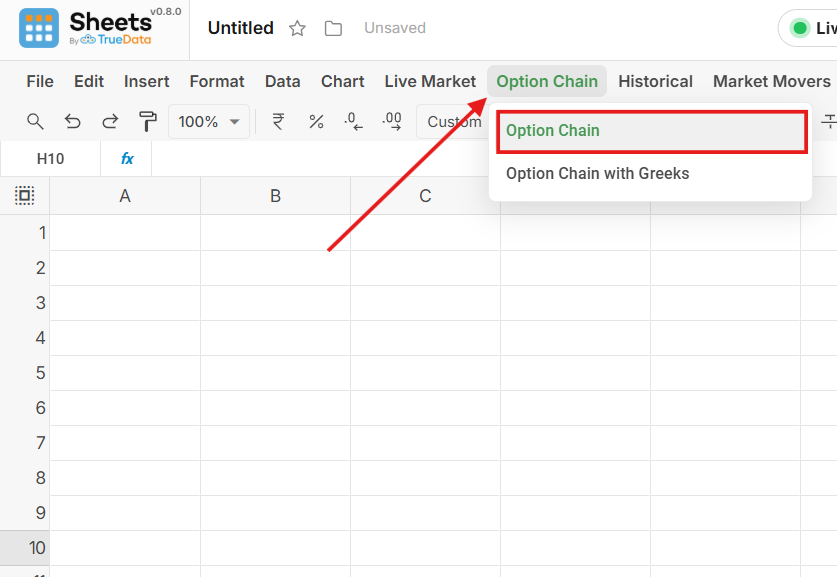
- Open Options from the toolbar.
- Select the Options formula you want to use.
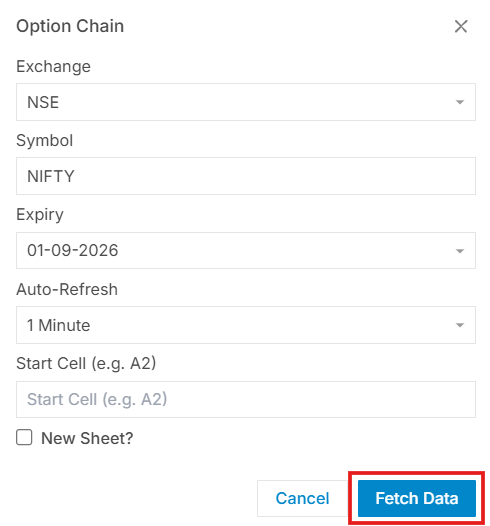
- Fill in the required input details.
- Click Fetch Data to load results into the sheet.
Required Input Fields
Exchange
Select the exchange — e.g. NSE, BSE
Underlying Symbol
Enter the stock or index ticker — e.g. NIFTY, RELIANCE
Expiry Date
Select the expiry from the dropdown — weekly or monthly contracts.
Output Cell
Choose where results will be placed — the top-left cell of the output range.
Annotated Preview
 Sheets by Truedata
Empowering traders and analysts with high-performance real-time market data directly within their spreadsheets.
Resources
Support
© 2026 TrueData Market Data Services LLP. All rights reserved.